Features · CarPlay
CarPlay for driving instructors
Roadworthy is a driving-instructor app with Apple CarPlay support. Plug your iPhone into the car and your teaching day appears on the dashboard screen — your next pickup with a live countdown, a brief on the pupil you're about to teach, and one tap to hand navigation to Apple Maps.
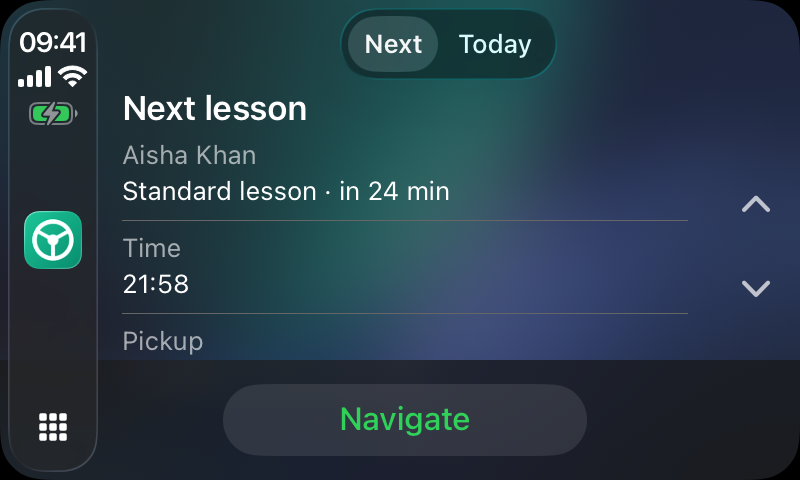
What's on the screen
The "Next" tab — your next pickup
Pupil name, lesson type, start time and a countdown that updates every minute ("in 24 min"). Below it, the pickup address and a green Navigate button. Tap it and Apple Maps takes over the CarPlay screen with the pickup already set as the destination — Roadworthy never tries to be a sat-nav itself.
The "Today" tab — the rest of your day
Every remaining lesson in time order with a day summary across the top — how many lessons are left, how many you've taught, and what you've received so far. Tap any lesson for its detail card with Navigate and Call buttons.
The pupil brief
When you finish a lesson in Roadworthy you note what you covered and what's next. CarPlay surfaces that before the following lesson: last time's topics, today's focus, pickup notes, and a countdown when the pupil's practical test is inside six weeks. You arrive already knowing the plan.
Tight-leg warnings & reminders
If the drive to a pickup needs more time than the gap between lessons allows, the lesson is flagged ("needs ~12 min to drive, 5 min free"). Lesson reminders fire 45 minutes before each lesson and appear on the CarPlay screen itself on iOS 18.4 or later — a leave-soon nudge on the dash, where you'll actually see it.
Why it's built the way it is
Apple gates CarPlay behind per-category entitlements, and Roadworthy holds the driving-task entitlement — the category for apps that help with the drive itself. Driving-task apps must use Apple's fixed set of templated screens (lists, information cards, tab bars) rather than free-form UI, are limited in how deep their screens can go, and can't draw their own maps. That's why every screen is glanceable, why the layout matches the rest of CarPlay, and why navigation hands off to Apple Maps: the constraints exist to keep a driving instructor's eyes on the road, and we designed inside them rather than around them.
"Between lessons I used to sit with my phone working out who's next and where. Now it's on the dash before I've pulled away — the countdown, the pickup, what we're working on. Tap, navigate, drive."
Frequently asked questions
Which cars does Roadworthy CarPlay work with?
Any car or aftermarket head unit that supports Apple CarPlay — wired or wireless. If Apple Maps and Messages show up on your car's screen, Roadworthy will too. There is no separate pairing: install the app, plug in (or connect wirelessly), and the Roadworthy icon appears on the CarPlay home screen.
Does Roadworthy navigate turn-by-turn on CarPlay?
No — and that's deliberate. Apple only permits turn-by-turn directions in dedicated navigation apps. Roadworthy shows your day and hands the pickup address to Apple Maps with one tap, so you get Apple's live traffic and routing rather than a second-rate built-in sat-nav.
What iOS version do I need?
Roadworthy supports iOS 18 and later. Everything works from iOS 18.0; lesson reminders appearing on the CarPlay screen itself use a capability Apple added in iOS 18.4.
Can I call or message a pupil from the car?
Each lesson's detail card has a Call button that hands the pupil's number to your car's phone system — useful when you're running late. Messaging from CarPlay is limited by Apple to dedicated messaging apps, so texts still go through Messages on your phone.
Do other driving-instructor apps have CarPlay?
As of July 2026 we're not aware of any other UK driving-instructor app with CarPlay support. CarPlay requires a per-app entitlement that Apple reviews and grants individually, which is a high bar; Roadworthy was built around the instructor's car from day one.
Is it safe (and legal) to use while driving?
Roadworthy's CarPlay screens are built entirely from Apple's driving-task templates, which are designed and reviewed for glanceability — large text, short lists, no typing. Interacting with CarPlay on the car's built-in screen is legal in the UK, unlike handling a phone. The app shows information and hands off actions; it never asks for input while you drive.
Try it on your own diary
Every feature is included in one subscription — £13.99/month after a 30-day free trial. No card commission, no per-booking charges.
Download on the App StoreOn Android? It's coming soon — join the list →